There is no single best AI image text editor, because the right tool depends on the job. This guide compares ten tools by how you change the words, what they cost and where your files go. Some detect the text so you can type a replacement, some give you manual control, and some regenerate the picture from a description. Tools such as EditText.ai let you edit text in an image by typing new words for each detected line.
Disclosure: EditText.ai publishes this guide, and EditText.ai is one of the ten tools, so we compete with several of the others. To keep the comparison fair, every fact comes from a tool's own pages and is dated as of October 2026. We give no scores, stars or rankings. We also ran no side-by-side image tests, so this guide doesn't say which tool gives the best result.
How we compared
For every tool we looked at the same six things: how you change the words, whether it also translates or removes text, the free option, the paid option, files and privacy, and the skill the work takes. If a fact wasn't on a tool's official pages, we left it out. Prices are in US dollars as the pages showed them in October 2026, and they can change or differ by region. These ten tools are a selection, not the whole market. Within each group, tools are listed in alphabetical order, and the order is not a ranking.
How these tools work
Detect-and-replace tools find the lines of text, remove them and draw your new words in their place, a form of inpainting. Design editors leave every pixel to you, so only what you touch changes. Chat assistants use a text-to-image model to generate a new version of the picture from your description. Both AI approaches can change details near the words, so check the whole image.
The ten tools at a glance (as of October 2026)
| Tool | What it is | How you change the words | Skill needed |
|---|---|---|---|
| EditText.ai | Text-in-image editor that also translates and removes text | Detects each line of text; you type a replacement and the image is redrawn | Low |
| edittextimage.com | Text-in-image editor that also translates into 20 languages | Replaces text in an existing image after a Google sign-in; has iPhone and Android apps and a Chrome extension | Low |
| Fotor | Online photo editor with an AI text editor | AI scans and highlights the text; you click a line and type, or describe the change | Low |
| Picsart | Photo and design app with an AI text editor | You select the text with auto-detection, a brush or a click, then remove or replace it | Low |
| ReWords AI | Text-in-image editor | You select the text and type a replacement; it regenerates the selected area | Low |
| Canva | Design app | Grab Text turns words in a photo into text boxes; Magic Eraser removes them | Low to medium |
| Photopea | Free browser image editor | You remove the old words and set new type by hand, with healing tools and a Type tool | Medium to high |
| Photoshop | Professional image editor | You remove the old words and set new type by hand, with the Remove tool, Content-Aware Fill and Generative Fill to help | High |
| ChatGPT | Chat assistant | You describe the change, or select an area first, and it generates a new version of the image | Low |
| Gemini app | Chat assistant | You upload an image and describe the change in chat | Low |
Cost and files (as of October 2026)
| Tool | Free option | Paid option as listed | Files and limits |
|---|---|---|---|
| EditText.ai | One free Standard edit, with a watermark | Monthly plans at $9, $29 or $49 a month for 10, 35 or 60 credits | PNG, JPG or WebP up to 14 MiB; PNG download |
| edittextimage.com | One free credit after Google sign-in, at 1K | One-time packs at $14.90, $26.90 or $39.90 for 40, 100 or 180 edits; credits never expire | PNG, JPEG or WebP up to 10 MB |
| Fotor | Free plan with limited credits | Pro, Pro+ and Max plans; prices are on its pricing page | JPG, JPEG, PNG or WebP |
| Picsart | Its page says changing existing text uses the object remover, a paid feature | Pro and Ultra plans billed yearly; prices are on its pricing page | Not stated on the page we read |
| ReWords AI | Free trial for new users, no credit card needed | Pay as you go; amounts not shown on the page we read | JPG, PNG or WebP up to 8 MB |
| Canva | Free plan; a cover-up and a crop work on it | Grab Text is a Pro feature; Magic Eraser is listed for Pro, Teams and Education | Not stated on the pages we read |
| Photopea | Free to use, supported by ads | Optional Premium account | Opens PSD, PNG, JPG, WebP, HEIC and more |
| Photoshop | No free Photoshop plan listed; its page points to free editing in the Firefly web app | US$22.99 a month on an annual plan billed monthly | Desktop app; some generative features need an internet connection |
| ChatGPT | Included in the free plan, with usage limits | Paid ChatGPT plans; see OpenAI's pricing page | PNG, JPEG and non-animated GIF up to 20 MB each |
| Gemini app | Available without a paid plan, with a daily quota | Google AI plans add Nano Banana Pro and higher limits | Downloads at 1K, or at 2K with a Google AI plan |
Tools built to detect text and replace it
As of October 2026, these tools find the text for you, so you type a replacement and the image is redrawn. They differ mostly in price model and extras.
- EditText.ai sells monthly credit plans and offers Edit, Translate and Remove in one editor. It runs in a web browser.
- edittextimage.com sells one-time credit packs, and its pricing page says credits never expire. Its translate page lists 20 languages, including Arabic and Hindi, which EditText.ai doesn't offer. EditText.ai translates into 35 languages.
- ReWords AI is pay as you go, and its page says one credit covers one image.
- Fotor and Picsart are broader editors where text replacement is one feature among many. Fotor's pricing page lists a free plan and paid plans.
Fotor's FAQ and edittextimage.com's page both single out very small text as a difficult case, so check small lettering at full size whichever tool you use. EditText.ai says results vary too.
Design and photo editors
As of October 2026, Photoshop and Photopea give you control over every step, and the work is manual: remove the old words, type new ones and match the look. Photoshop has helpers such as the Remove tool, Content-Aware Fill and Generative Fill. Photopea is free with ads, and it says your files stay on your device. Both give you the control that exact brand typography, layered files or print work calls for.
Canva is a natural choice when the design already lives there. Grab Text, a Pro feature, turns words in a photo into editable text boxes, and Magic Eraser removes them. Canva's help says Grab Text works best on straight Latin-alphabet text, not on rotated or arched text.
Our step-by-step guides cover Photoshop, Photopea and removing text in Canva. If text in a Canva design won't change, see why you can't edit text in Canva.
AI chat assistants
As of October 2026, ChatGPT and the Gemini app generate a new version of the picture from your description. OpenAI's help center says you can select an area first, and it notes that highlights aren't always precise and edits may extend beyond the area you selected. Google's Gemini Apps Help says you must be 18 or over to generate and edit images, that there is a daily quota, and that downloads are 1K, or 2K with a Google AI plan. Google's AI plans page lists higher limits for Nano Banana Pro on its paid plans.
These assistants fit creative changes where a redrawn picture is fine. They are a weaker fit when everything except the words must stay as it is. Our post can ChatGPT edit text in images explains what to expect.
About EditText.ai
EditText.ai works in three steps.
- Upload a PNG, JPG or WebP image up to 14 MiB. The text is detected automatically and listed line by line.
- Type the new words beside each line you want to change, and leave the other lines as they are.
- Choose Standard or High quality, apply the change, compare the result with the original, and download the PNG.
There is no font to pick, because the image itself guides the lettering. Results can vary, especially with unusual lettering or detailed backgrounds. Other limits to know: it runs in a web browser with no phone app, it sells monthly plans rather than one-time packs, and it doesn't accept HEIC. To keep the same lettering style, read how to edit text in an image with the same font.
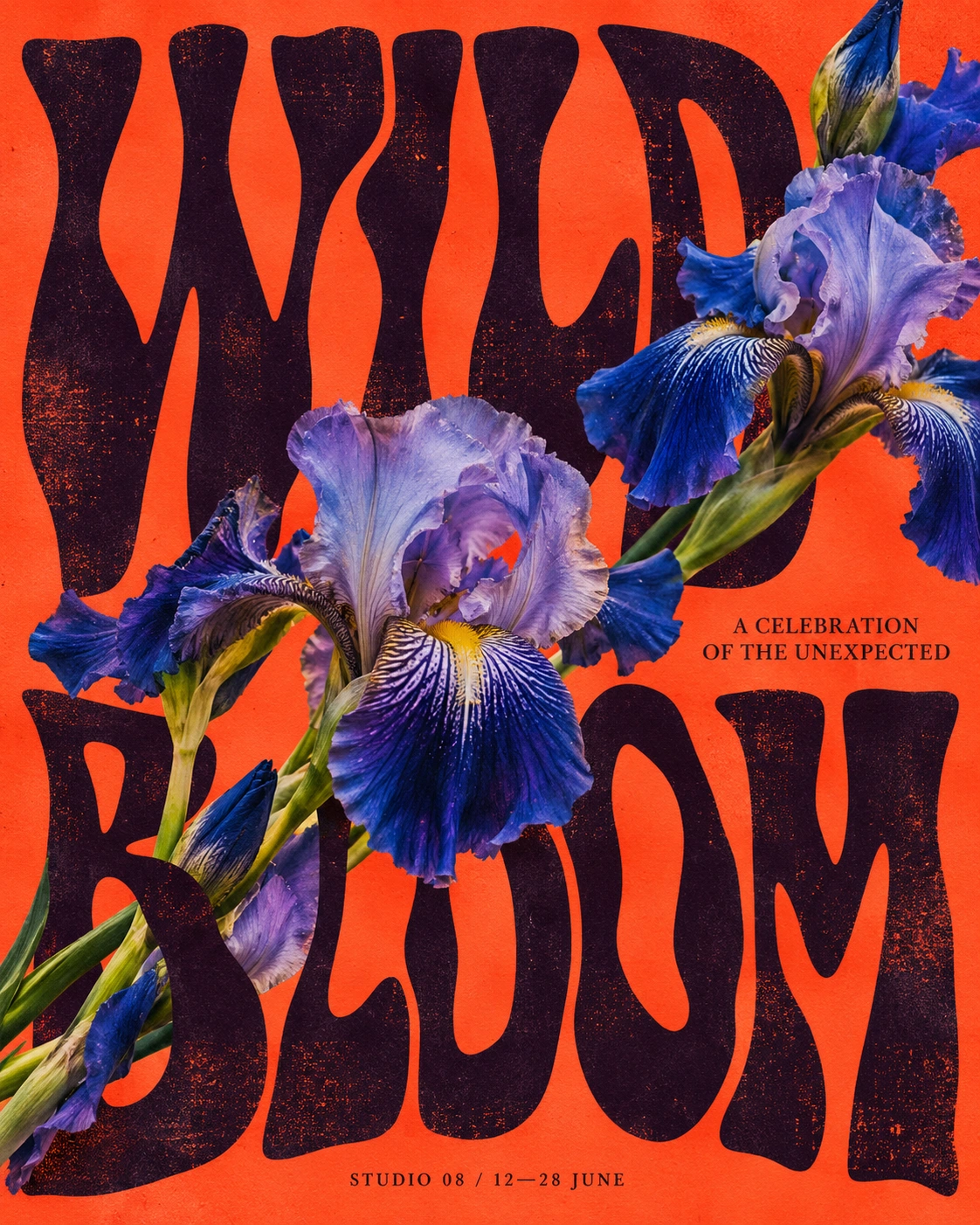
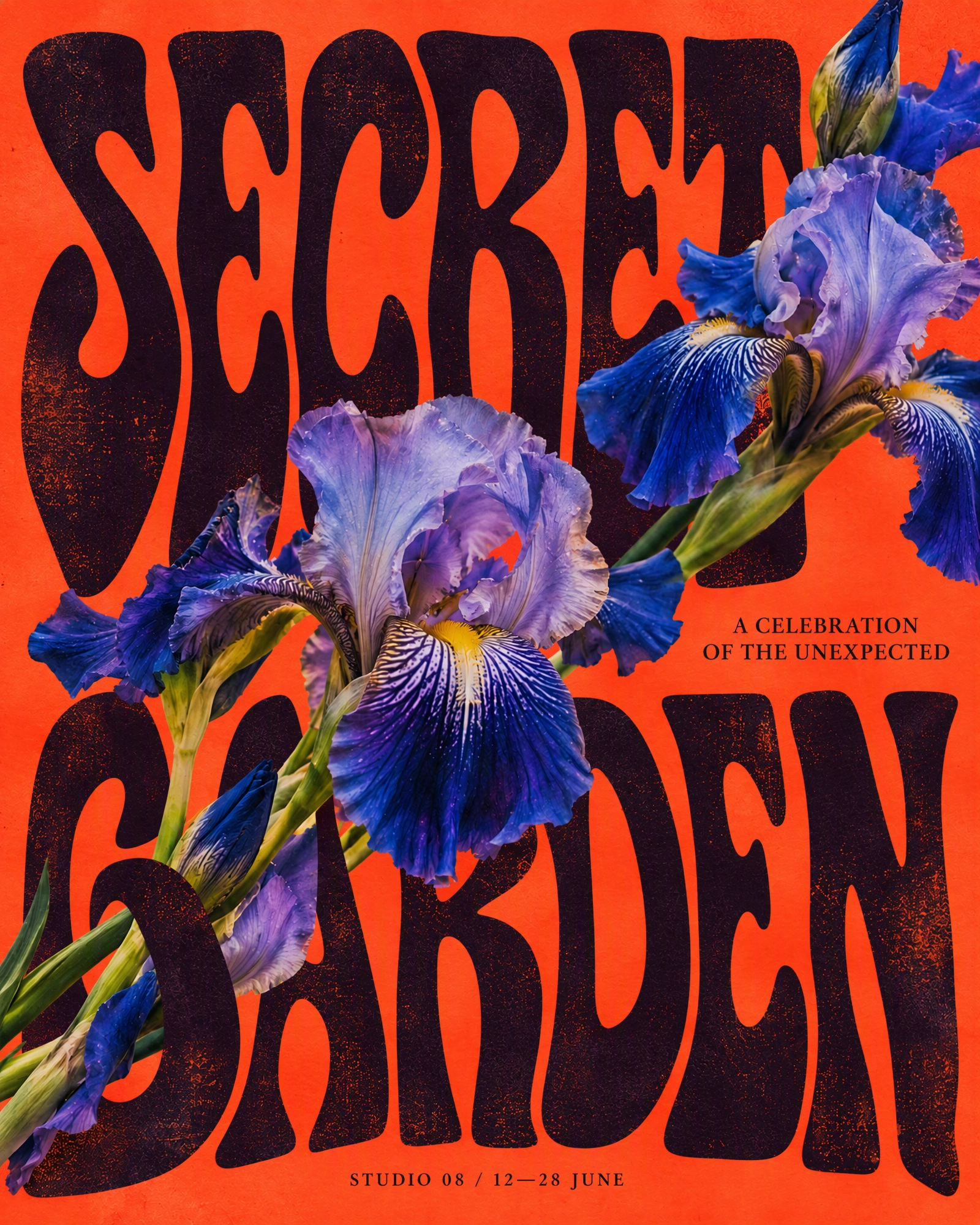
An EditText.ai example, shown here because EditText.ai publishes this guide: WILD BLOOM changed to SECRET GARDEN.
Standard uses 1 credit and High quality uses 2 credits at 1K. Paid plans can also edit in 2K or 4K, where Standard uses 2 or 3 credits and High quality 5 or 7. You get one free Standard edit, which carries a watermark. Plans are listed on the pricing page.
EditText.ai can also translate text in an image and remove text from an image. Translating the detected text is free, and applying a translation or a removal costs a normal edit. The one free Standard edit works for both. Its Remove tool doesn't remove watermarks.
Which tool for which job
- You need exact brand typography, print files or layered deliverables. Use Photoshop, or Photopea if you want a free tool.
- The design already lives in Canva. Edit the live text in Canva, and use Grab Text or Magic Eraser for words inside photos.
- You want a free tool and need your files to stay on your device. Use Photopea.
- You want to change the words on a poster, sign or product photo without picking fonts. Try a detect-and-replace tool, and compare the price models: monthly credit plans, one-time packs, pay as you go, or a wider editor.
- You need only one or two edits and don't want a subscription. One-time packs, such as edittextimage.com's, or a free trial edit may suit you better than a monthly plan.
- You need to translate the text. EditText.ai translates into 35 languages, and edittextimage.com lists 20, including Arabic and Hindi.
- You want a creative redesign, not an exact edit. Use ChatGPT or the Gemini app.
For a wider look at manual methods, phone apps and Canva, see how to edit text in an image.
Check these before you upload an image
- Permission. Only edit images you own or have permission to change. Leave watermarks, logos and credits in place.
- Where your files go. As of October 2026, Photopea says files stay on your device. edittextimage.com's privacy policy says images are deleted about 7 days after the edit and aren't used to train generative AI models. ReWords AI says files are deleted automatically after a brief period. EditText.ai keeps your images private to your account in My images. For every other tool, read its privacy policy.
- File types. Convert iPhone HEIC photos to JPG or PNG before you upload them to EditText.ai.
- What it won't do. edittextimage.com's page says it doesn't support edits to identity or official documents. Don't use any of these tools to change documents, records or screenshots in a way that could mislead anyone.
- The result. Zoom to full size and check small text, edges and the area around the words.
Try it on your own image
Upload your picture to edit text in an image with EditText.ai, type the new words and compare the result with the original. The first edit is free, with a watermark.
Frequently asked questions
What is the best AI image text editor?
None is best for every job, and this guide doesn't rank the tools. Choose by what you need: exact control, a free tool, a design that lives in an app, a quick text replacement, or a creative redesign.
Can I edit text in an image for free?
Yes, in a few ways. As of October 2026, Photopea is free to use with ads, and the work is manual. EditText.ai gives one free Standard edit with a watermark, edittextimage.com gives one free credit after sign-in, and ReWords AI offers a free trial. ChatGPT and the Gemini app can edit images without a paid plan, with limits.
Do AI text editors keep the original font?
They don't pick a font from a list. They redraw the lettering so that it follows the image, and results vary. EditText.ai has no font picker. If you need an exact, named font, use Photoshop or Photopea and choose the font yourself. Our guide on how to identify a font from an image can help you find it.
Are my images private when I use an online editor?
It depends on the tool. Photopea says files stay on your device, and the other tools process images online, with the storage rules listed above. Read each tool's privacy policy first.
How current is this comparison?
Every fact is dated October 2026 and comes from the tool's own pages that month. Tools change their plans and features often, so we plan to re-check this guide every quarter. If a detail looks out of date, check the tool's official page.