Copy text from an image and paste it anywhere
Some of the words you need are stuck in a photo, a poster, a slide, a menu or a recipe card, where you cannot select them. Upload the image, copy the text that appears beside it, and paste it into a document, an email or a spreadsheet instead of typing it out again. Reading the text uses no credits.
Or drop an image here. PNG, JPG or WebP, up to 14 MiB.
Your image stays on this device until you sign in.
Sign in with Google to upload. Reading the text is free and uses no credits.
Examples
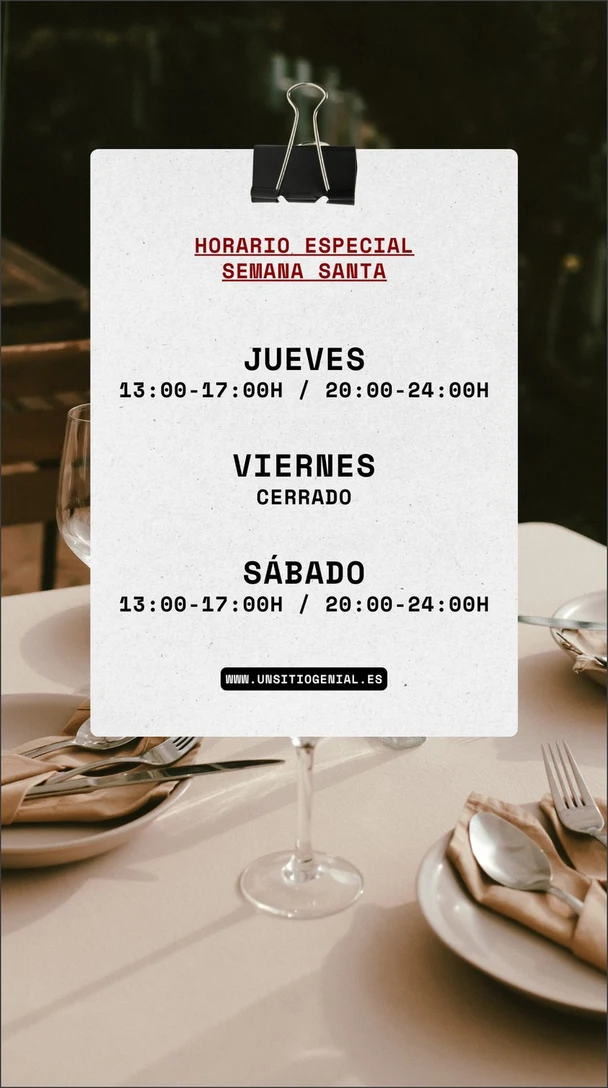
Text read from the image
HORARIO ESPECIAL
SEMANA SANTA

JUEVES
13:00-17:00H / 20:00-24:00H

VIERNES
CERRADO

SÁBADO
13:00-17:00H / 20:00-24:00H

WWW.UNSITIOGENIAL.ES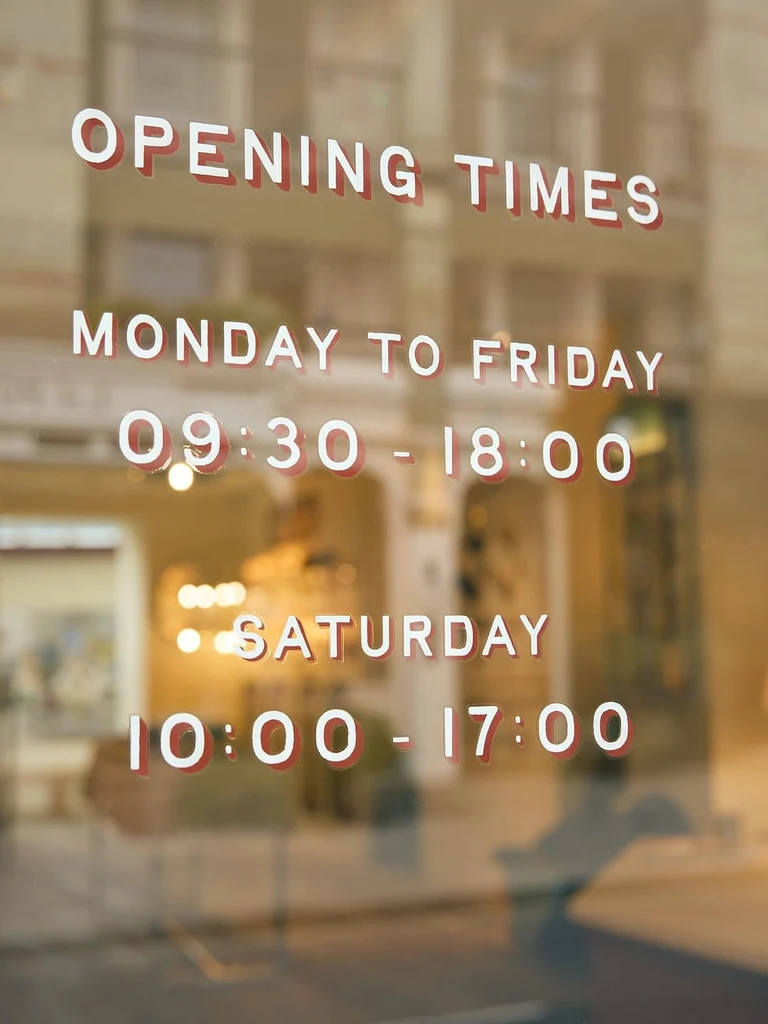
Text read from the image
OPENING TIMES
MONDAY TO FRIDAY
09:30 - 18:00
SATURDAY
10:00 - 17:00How it works
Sign in and upload the image
Sign in with Google, then upload a PNG, JPG or WebP file up to 14 MiB. PDFs are not accepted, so if your words are on a PDF page, take a screenshot of that page and upload the screenshot.
Find the text beside the image
The text appears next to your image in reading order. Each line in the image becomes one line of text, and separate blocks such as columns, paragraphs or signs are divided by a blank line. It stays in the language it was written in.
Compare it with the image
Read the text against the original before you use it, especially names, numbers, prices and email addresses. Small, blurry or low-contrast text can be misread or skipped, so look at those spots first.
Copy it or download it
Select Copy all to copy everything, or copy a single line when you only need part of the image. You can also download all of the text as a .txt file.
Change the image itself, if you want to
The Edit this text in the image and Translate buttons open the same image in the Edit text or Translate tools. Those tools change the picture itself and use credits; copying the text does not.
What comes back when you copy text from an image
You get plain text beside the image, in reading order. Each line in the image becomes one line of text, and a blank line separates blocks that stand apart, such as the columns of a menu, the paragraphs of a flyer or two different signs in one photo.
The words stay as they were written. The language, the characters and the accents are kept, and nothing is translated or rewritten. Fonts, colors and positions do not come along, because plain text can go into a document, a message or a spreadsheet without carrying any design with it.
Posters, slides, menus and recipe cards
Photos, slides, posters and graphics all work the same way. Here are some common jobs, and what to check on each one.
- Posters and flyers: copy the dates, times and addresses into a calendar entry or a message, then check each one against the poster.
- Slides: copy the bullet points and quotes from a photo of a slide into your notes.
- Menus and signs: copy the dishes, business hours or directions, and check every price against the photo.
- Recipe cards: copy the ingredient list into a shopping list, and check every quantity.
- Graphics and quote cards: copy the words so you can search for them or quote them in your own text.
Set up the image for a cleaner result
The clearer the letters are in the image, the better the text you get back. These habits help the most:
- Use the original, uncompressed file. A copy that was shrunk or compressed when it was shared gives the AI less detail to work with.
- Crop to the area with the text, so the image holds only the words you want to copy.
- Take photos straight on, in good light, with the page or sign flat and facing the camera.
- Use one page or one screen per image, so each result matches one source and is easy to check.
Check the text before you rely on it
Copying saves typing, but it does not replace reading. Small, blurry, low-contrast or heavily stylized text, such as a decorative script on a poster, can be misread or skipped. Compare the text with the image before you rely on it, and look hardest at these:
- Names, including spellings and accents.
- Numbers, such as dates, times, quantities and phone numbers.
- Prices and currency symbols.
- Email and web addresses, where one wrong character breaks the whole address.
- Characters that look alike, such as the number 0 and the letter O.
Copy first, then change the image if you need to
Copying the text leaves your image untouched. If the words in the picture need to change, such as an old date on your own flyer or a sign you want in another language, there are two buttons for that. Edit this text in the image opens the same image in Edit text, and Translate opens it in Translate. Both tools change the image itself and use credits, while reading and copying its text does not.
Frequently asked questions
Can I copy text from a photo I took on my phone?
Yes. Upload the photo as a PNG, JPG or WebP file up to 14 MiB. Photos give the best text when they are taken straight on, in good light, with the page or sign flat. If the words fill only a small part of the photo, crop to that area first so the letters take up more of the image.
Is it free to copy text from an image?
Yes. Reading text uses no credits, with or without a plan. You do need to sign in with Google first, because the tool works only with an account. Credits are used only if you then change the image itself with Edit text or Translate, which are separate tools.
Will the copied text keep the layout and fonts?
No. The text comes back as plain text in reading order, with one line for each line in the image and a blank line between separate blocks. Fonts, colors and positions are not kept, so a poster becomes a list of lines, not a copy of its design. Format the lines in your own document if you need a particular layout.
What should I do if words are missing or wrong?
Small, blurry, low-contrast or heavily stylized text can be misread or skipped. Start from a better image: use the original file, crop to the text, and retake the photo straight on in good light with the page flat. Then upload the better image, and correct whatever is still wrong in your own document.
Can I copy text from several images?
Yes, one at a time. An account reads one image at a time, so wait for the text to appear before you upload the next image. Each image stays in My images, private to your account, and opening it again shows its text without reading it again.
Try it on your own image
Or drop an image here. PNG, JPG or WebP, up to 14 MiB.
Your image stays on this device until you sign in.
Sign in with Google to upload. Reading the text is free and uses no credits.