Turn handwriting into typed text you can edit
Handwritten notes, whiteboards, chalkboard menus, recipe cards, letters and labels are hard to search, share or edit as photos. Upload a photo and the writing comes back as typed text you can copy. Neat, clear handwriting works best, and messy or faint writing needs a careful check against the image.
Or drop an image here. PNG, JPG or WebP, up to 14 MiB.
Your image stays on this device until you sign in.
Sign in with Google to upload. Reading the text is free and uses no credits.
Examples
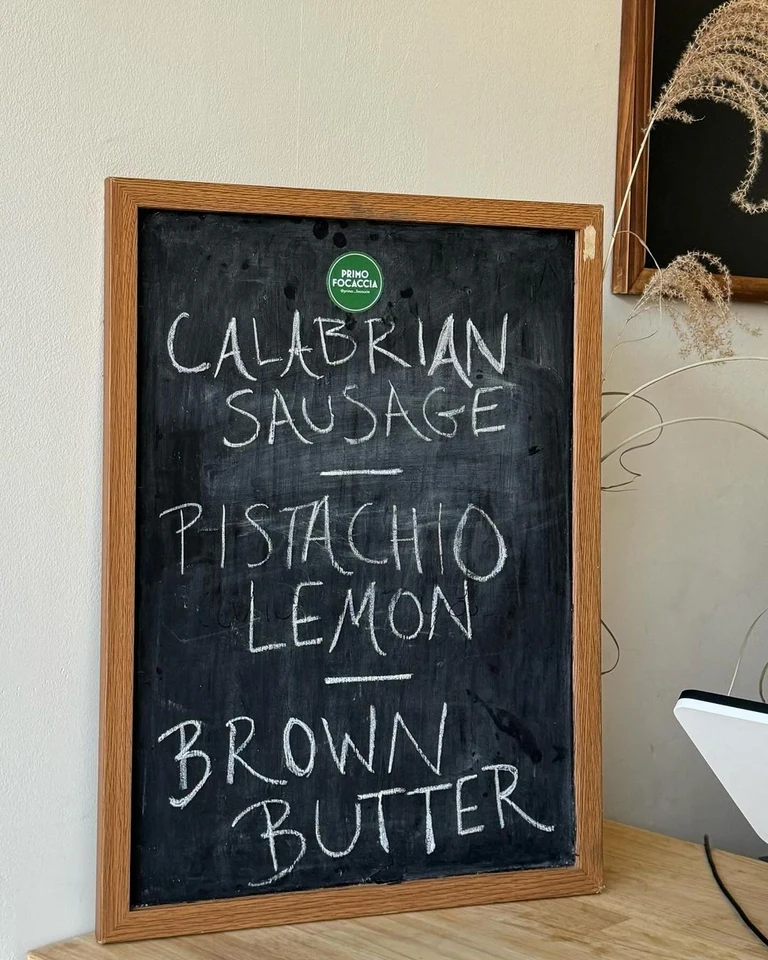
Text read from the image
PRIMO FOCACCIA
CALABRIAN
SAUSAGE
PISTACHIO
LEMON
BROWN
BUTTER
Text read from the image
BUNET
(PASTRIES & COFFEE)
Come in for
a taste of comfort!
Baked delights:
flaky croissants
and soft muffins
A welcoming
space to relax
and recharge
Handcrafted coffee:
from bold espressos
to silky lattes
Open Hourse: 8AM-6PM
123 BREW LANE, BEANVILLE, NY
BUNETCOFFEE.SITE.COMHow it works
Photograph the writing and upload it
Take the photo straight on, in good light, with the page flat. Then sign in with Google and upload it as a PNG, JPG or WebP file up to 14 MiB. Crop to the writing if the photo shows more than you need.
Read the typed text beside the photo
The text appears next to your photo in reading order, with one line for each line of writing and a blank line between separate blocks. It stays in the language it was written in, and nothing is translated or rewritten.
Check every line against the handwriting
Compare the text with the photo line by line. Messy, faint or slanted writing can come back with mistakes or missing words. Check names, numbers, prices and email addresses most closely, because one wrong character changes them.
Copy the text or download a .txt file
Select Copy all, or copy a single line. You can also download the text as a .txt file to keep with your notes. Fix any mistakes in your own document, where you can type over them.
Change the image itself, if you want to
The Edit this text in the image and Translate buttons open the same image in the Edit text or Translate tools, which change the picture and use credits. You do not need them to copy handwriting as text.
How well handwriting comes through
Handwriting varies more than print, so the result depends on the writing. Neat, clear handwriting works best. Messy, faint or slanted writing may come back with mistakes or missing words, and so can small, blurry or low-contrast writing.
Treat the typed text as a first draft that you check, not as a finished copy. When most of a page comes back correctly, you save the typing and only fix the lines that did not. When a page comes back with many errors, retake the photo with the tips below before you start correcting.
Notes, boards, recipe cards, letters and labels
Different kinds of writing need slightly different care.
- Notes and notebooks: photograph one page at a time, with the page flat so the lines run straight across the photo.
- Whiteboards and chalkboards: photograph the board straight on, in good light, before it is erased, and crop to the writing. Decorative lettering with flourishes is heavily stylized text, which can be misread or skipped.
- Recipe cards: check every quantity and temperature against the card, because one wrong digit changes the dish.
- Letters and cards: keep the photo as well as the text, so you can compare any line that looks wrong later.
- Labels: crop each label so the writing fills the image, and check the text, since a label may hold only a name or a number.
Take a photo that reads well
A better photo is the biggest thing you control. These habits help the most:
- Use the original, uncompressed file. A copy that was shrunk or compressed when it was shared gives the AI less detail to work with.
- Photograph straight on, in good light, with the page flat. A page held at an angle slants the letters and can leave part of it in shadow.
- Crop to the area with the writing, so the image holds only the words you want.
- Use one page per image. For a longer note, photograph each page and read them one after another, because an account reads one image at a time.
Check the text before you use it
Compare the typed text with the writing line by line. A quick count helps: if the photo has twelve lines and the text has ten, find which lines are missing. Then look hardest at the details that matter most.
- Names and their spellings.
- Numbers, such as dates, times, quantities and phone numbers.
- Prices and amounts of money.
- Email and web addresses, where one wrong character breaks the whole address.
Frequently asked questions
How accurate is handwriting to text?
It depends on the writing. Neat, clear handwriting works best. Messy, faint or slanted handwriting may come back with mistakes or missing words, and small, blurry or low-contrast writing can be misread or skipped. Always compare the text with the image before you rely on it, especially names, numbers, prices and email addresses.
Can it read messy handwriting?
It may read some of it, but messy handwriting is where mistakes and missing words are most likely. Treat the result as a first draft: compare it with the photo and correct the errors in your own document. If too much is wrong, retake the photo straight on, in good light, with the page flat.
Can I turn a whiteboard or chalkboard into text?
Yes, when the writing is clear. Photograph the board straight on, in good light, and crop to the area with the writing. Decorative chalk lettering with flourishes is heavily stylized text, which can be misread or skipped, so compare the result with the photo before you copy a menu or a list of prices from it.
Do I need credits or a plan to read handwriting?
No. Reading the text uses no credits, with or without a plan, and you only need to sign in with Google first. Credits are used only if you then use the Edit text or Translate tools to change the image itself.
Does it translate my handwriting?
No. The text comes back in the language it was written in, with the original characters and accents, and nothing is translated or rewritten. To put the words in the image itself into another language, the Translate button opens the same image in the Translate tool, which changes the image and uses credits.
Are my photos of handwriting private?
Images stay in My images, private to your account. Opening an image again shows its text without reading it again, so you can come back to a note later and copy it again. Delete any photo you no longer need from My images.
Try it on your own image
Or drop an image here. PNG, JPG or WebP, up to 14 MiB.
Your image stays on this device until you sign in.
Sign in with Google to upload. Reading the text is free and uses no credits.