Remove a date stamp from a photo
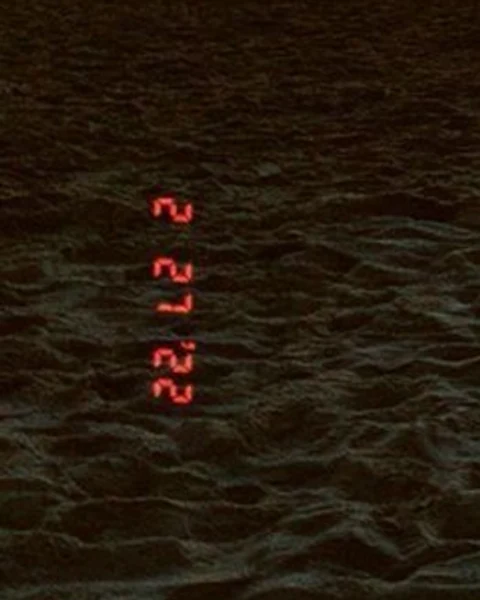
Many film cameras could print the date in small orange or red digits near a corner of the picture. If you are scanning old family photos, you can remove the date stamp from a photo and keep the rest of the picture as it is. This is meant for your own personal photos only.
Or drop an image here. PNG, JPG or WebP, up to 14 MiB.
Your image stays on this device until you sign in.
Sign in with Google to upload. Your first Standard edit is free and includes a watermark.
Examples





How it works
Scan or convert the photo
Scan the print on clean glass. If you use an iPhone photo of the print instead, convert it to JPG if it is a HEIC file, because HEIC is not supported.
Select the date digits
Tick the detected date imprint as the text to remove. If the small digits were missed or only partly found, use Add missing text and type them as they appear, such as '98 7 14.
Apply at the right quality
If the digits sit over grass, fabric, hair or water, choose High quality (2 credits) for finer detail; over plain sky or a wall, Standard (1 credit) is the faster option. For a large scan, paid plans can also choose 2K or 4K, where High quality uses 5 or 7 credits and Standard 2 or 3. Then select Remove selected text.
Check the corner up close
Compare before and after with the slider, then view the download at full size. Look for orange traces, a smudged patch or changed detail where the digits were.
Prepare a clean scan
To remove a date stamp from a photo cleanly, the scan has to show the small digits clearly. Dust, scratches and glare around the corner can be mistaken for part of the stamp or make the digits harder to find.
- Wipe the print gently with a soft, dry cloth, and clean the scanner glass before you start.
- Scan at a high resolution so the digits and the detail around them stay sharp.
- Save the scan as JPG or PNG. If it is larger than 14 MiB, save it as JPG or scan again at a lower resolution.
- If you photograph the print with a phone instead, hold the phone parallel to the print and shoot in even light, so lamps or windows do not reflect off the surface.
- Keep the unedited scan as your archive copy.
Small digits need extra attention
Date imprints are made of simple segments, often with soft edges, and they fade with the rest of the print. Some sit over a bright area where the orange is hard to see. Detection may miss them completely or find only part of the date.
If the digits are not listed, use Add missing text and type them exactly as you see them, including any apostrophe before the year. If only part of the stamp was found, add the missing digits the same way so the whole stamp is selected.
After applying, look for a faint orange glow. The imprint can spread slightly beyond the digits, and that glow can remain when the numbers are gone. If you see traces, applying again with High quality may help.
Check fine detail around the stamp
The stamp sits over whatever happened to be in that corner: grass, a sleeve, a patterned rug or part of a face. Details next to the digits can change with them, and texture is harder to rebuild than a plain area.
Compare at full size and look at the fine detail around the corner: blades of grass, the weave of fabric, the edge of a face or a hand. If something important changed, try High quality.
When the stamp crosses a face, judge the repair at the size you will print or share the photo. A small change around the eyes or mouth is more noticeable than the same change in grass or leaves.
Frequently asked questions
Will this also fix scratches, dust or faded colors?
No. Removal works on the text you select, so dust, scratches, fading and color shifts elsewhere in the picture stay as they are. Repairing that kind of damage is a separate job for photo restoration software or a restoration service. If the date stamp sits on a scratched or faded area, results can vary more, so compare closely.
Does this work on dates added by digital cameras or phones?
Yes, as long as the date is part of the picture itself. Some digital cameras and camera apps can print the date onto the image, and you remove it the same way. A date that appears only in the file information or in your photo library is not in the picture, so there is nothing to remove.
Should I record the date before I remove it?
Yes. On a film photo, the imprint may be the only record of when the picture was taken. Put the date in the file name, or enter it in your photo library if it lets you edit dates, before you upload the scan. When you share the cleaned photo, you can include the date in your message or caption.
Is cropping the corner a better option?
Sometimes. If the stamp sits right at the edge and nothing important is near it, a small crop is simple and leaves no trace. Removal keeps the full frame, which matters when the corner holds part of a person, the horizon line or other details you want to keep. If you are unsure, try removal first; the original stays in My images.
Try it on your own image
Or drop an image here. PNG, JPG or WebP, up to 14 MiB.
Your image stays on this device until you sign in.
Sign in with Google to upload. Your first Standard edit is free and includes a watermark.