Convert a JPG to text you can copy and paste
Photos from a phone or a camera, and scans of printed pages, are usually JPG files, so the words in them cannot be selected or searched. Upload the JPG, copy the text that appears beside it, and paste it into a document, a message or a spreadsheet. Reading the text uses no credits.
Or drop an image here. PNG, JPG or WebP, up to 14 MiB.
Your image stays on this device until you sign in.
Examples
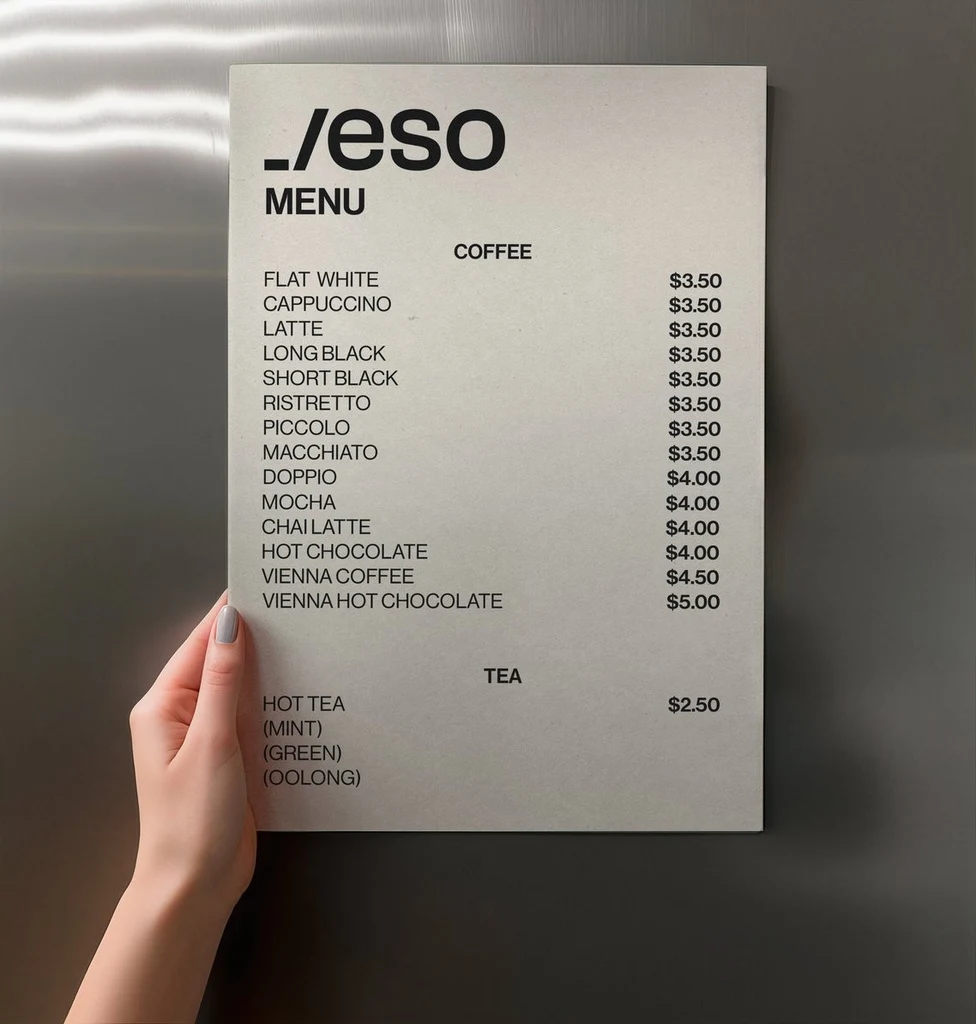
Text read from the image
_/eso
MENU
COFFEE
FLAT WHITE	$3.50
CAPPUCCINO	$3.50
LATTE	$3.50
LONG BLACK	$3.50
SHORT BLACK	$3.50
RISTRETTO	$3.50
PICCOLO	$3.50
MACCHIATO	$3.50
DOPPIO	$4.00
MOCHA	$4.00
CHAI LATTE	$4.00
HOT CHOCOLATE	$4.00
VIENNA COFFEE	$4.50
VIENNA HOT CHOCOLATE	$5.00
TEA
HOT TEA	$2.50
(MINT)
(GREEN)
(OOLONG)How it works
Sign in and upload the JPG
Sign in with Google, then upload the file. A JPG, PNG or WebP up to 14 MiB works. If the photo is larger, take it again at a lower setting or crop it to the part with the words.
Read the text beside the photo
The text appears next to your JPG in reading order, with one line for each line in the photo and a blank line between separate blocks such as columns, paragraphs or signs. It stays in the language it was written in.
Compare it with the photo
Read the text against the picture before you use it, especially names, numbers and prices. Small, blurry or glare-covered text can be misread or skipped, so look at those spots first.
Copy it or download it
Select Copy all, or copy a single line if you only need part of the photo. You can also download all of the text as a .txt file.
Photos, scans and handwriting
A JPG is the usual format for photos, so it is also the usual format for a picture of a menu, a sign, a page of a book or a note. The text comes back in reading order, in the language it was written in, with the original characters and accents. Nothing is translated or rewritten.
Clear handwriting is read too, such as a chalkboard menu or a note on a label. Faint, slanted or very messy writing can come back with mistakes, so compare it with the photo.
Take the photo so the words read cleanly
A JPG is compressed, and every time it is saved or shared again it can lose a little more detail. These habits give the best result:
- Use the original file from your camera or scanner, not a copy that was shrunk or compressed when it was sent.
- Hold the camera straight above the page or sign, with the page flat and facing the camera.
- Use even light and avoid glare, shadows across the words and a flash that bleaches them out.
- Come close enough that the letters are large in the photo, and crop to the words you need.
Check the text before you rely on it
Reading saves typing, but it does not replace reading. Small, blurry, low-contrast or heavily stylized text can be misread or skipped. Compare the text with the JPG before you use it, and look hardest at these:
- Names, including spellings and accents.
- Numbers, such as dates, times, quantities and phone numbers.
- Prices and currency symbols.
- Characters that look alike, such as the number 0 and the letter O.
From text to a document or a sheet
Copying the text leaves your photo untouched. When you want the words as a file, Image to Word saves them as an editable Word document, and Image to Excel turns a table in the photo into a spreadsheet. Both read the photo for free. Edit this text in the image and Translate open the same photo in the Edit text and Translate tools, which change the picture itself and use credits.
Frequently asked questions
How do I convert a JPG to text?
Sign in with Google, then upload your JPG. The text appears beside the photo in reading order. Select Copy all to copy everything, copy a single line, or download the text as a .txt file. Compare the text with the photo before you use it.
Is it free to convert a JPG to text?
Yes. Reading text uses no credits, with or without a plan. You do need to sign in with Google first, because the tool works only with an account. Credits are used only if you then change the photo itself with Edit text or Translate, which are separate tools.
Can it read a JPG of handwriting?
It reads clear handwriting, such as notes, chalkboard menus and labels written by hand. Faint, slanted or very messy writing can come back with mistakes or missing words. Compare the text with the photo, and correct whatever is wrong in your own document.
Why are some words wrong or missing?
Small, blurry, low-contrast or heavily stylized text can be misread or skipped, and a heavily compressed JPG holds less detail. Use the original file, crop to the words, and retake the photo straight on in even light if you can. Then upload the better photo.
Does the JPG stay private?
Your photos stay in My images, private to your account, until you delete them. Opening one again shows its text without reading it a second time. If a photo shows personal details you do not want to keep, copy the text you need and then delete the image.
Try it on your own image
Or drop an image here. PNG, JPG or WebP, up to 14 MiB.
Your image stays on this device until you sign in.