Yes, for reading. Upload a photo to ChatGPT and ask for a translation, and it can give you the text in your language. It can also explain context and tone. Check the result carefully when the text is small, rotated or written in a non-Latin script, because OpenAI lists these among the known limits of image input.
ChatGPT can also try to redraw the image itself in another language with ChatGPT Images, but results vary. The layout and other details can shift, and spelling in the target language needs checking, especially in non-Latin scripts. If you need a translated image that you can publish, a tool made to translate text in an image in place is often the better fit.
Two different jobs
People who ask this question usually want one of two things:
- Job A: understand the text. You have a photo of a sign, a menu, a label or a page of instructions in a language you don't read, and you want to know what it says.
- Job B: publish a translated image. You have a poster, a product image, a menu board or a slide, and you need the same image in another language.
Job A matches what ChatGPT's image input is designed for: understanding and interpreting images that you add to a conversation. Job B is harder, because it means drawing new text into a picture rather than writing a reply. The sections below cover each job and the tools that fit it.
Job A: Translate a photo so you can understand it
ChatGPT can read the text in a photo and translate it in the same reply. According to OpenAI's help center, image uploads are available on free and paid plans with usage limits that vary by plan (as of October 2026).
- Take a clear photo. Hold the camera straight, avoid glare, and move close enough that the text is large in the frame.
- Upload it to ChatGPT. OpenAI's help center lists PNG, JPEG and non-animated GIF files up to 20 MB each.
- Ask for a line-by-line translation. Ask ChatGPT to copy each line in the original language and put the translation under it. This shows you which words it read and how it translated them.
- Protect what must not change. Tell it to keep names, prices, numbers and addresses exactly as written.
- Ask it to flag what it can't read. Ask it to mark unclear words instead of guessing.
- Ask follow-up questions. You can ask what a dish is, whether a phrase is formal or casual, or what a sign means in its context.
A prompt that covers these steps:
Copy the text in this photo line by line, then translate each line into English. Keep names, prices and numbers exactly as written. If you can't read a word, mark it as unclear instead of guessing.
What to watch for when ChatGPT reads a photo
OpenAI's help center lists several limits that matter for translation:
- Non-Latin scripts. The model handles text in non-Latin alphabets, such as Japanese or Korean, less well.
- Small text. OpenAI recommends enlarging text to improve readability, but without cropping out important details.
- Rotated text. Text that is sideways or upside down can be misread.
- Resizing. Images are resized before ChatGPT analyzes them, which is one more reason to make the text large in the frame.
A translation can also sound fluent and still contain a mistake. Machine translation of any kind can struggle with short labels, abbreviations and phrases that have no context. For anything important, such as instructions for medicine, check with a second source or a person who reads the language.
For quick reading on your phone, Google's camera tools are another good option. Google says that Google Lens can overlay the translation on top of the original text on your phone screen. For a full comparison, see can Google Translate translate text in an image.
Job B: Get a translated version of the image
ChatGPT Images can try this job. As of October 2026, the current version is ChatGPT Images 2.5, and OpenAI's help center says it is available on all ChatGPT plans, on the web, iOS and Android. You can upload an image and describe the change, or select the image to open the editor, highlight an area with the selection tool, and then describe the change for that area.
To try it:
- Approve the wording first. Ask ChatGPT to list every line of text with a translation, then correct anything that is wrong, such as names, prices or product terms.
- Ask for the redraw. Ask ChatGPT to replace each line with the approved translation and to keep the layout, colors, lettering style and everything else unchanged.
- Work on one area at a time if needed. Use the selection tool to limit each change to one block of text.
- Check every line at full size. Compare the new text with the approved wording letter by letter, including accents and special characters.
- Compare the whole image with the original. Look for shifted elements, changed details and text that no longer fits its space.
What to check most carefully:
- Spelling in the target language. Image generators draw text as shapes, so a translation that was correct in the chat can come out misspelled in the picture. The reasons are explained in why AI image generators can't spell. This matters most when you can't read the target script yourself.
- Layout. The redrawn image may move, resize or restyle elements. OpenAI's help center notes that highlights are not always precise and that edits can extend beyond the area you selected.
- Text length. A translation that is longer than the original may be squeezed, wrapped or cut off.
- Nearby details. Faces, products and fine patterns close to the text may be drawn again.
For more on what happens when ChatGPT changes the words in a picture, see can ChatGPT edit text in images.
A translate-in-place alternative
For job B, a translate-in-place workflow keeps the focus on the text instead of the whole picture. As of October 2026, EditText.ai's new Translate tool works this way:
- Upload a PNG, JPG or WebP image up to 14 MiB.
- The text is detected automatically, and you choose the language, from the 35 languages the EditText.ai site is available in.
- All detected text is translated by default. To translate only some lines, switch off Translate all text and keep only the ones you want ticked; unticked lines, such as a brand name, stay as they are.
- The text is translated as the image is redrawn, in place and in a matching style. Prices, links and names are kept where possible. Applying uses 1 credit at Standard or 2 credits at High quality, and you download the result as a PNG. Paid plans can also translate in 2K or 4K, for 2 or 3 credits at Standard and 5 or 7 at High quality.
There is no separate translation step to review first. The one free Standard edit also works for Translate, with a watermark. Like any AI edit, results can vary, especially with unusual lettering or detailed backgrounds. Check every line of the finished image before you publish it.
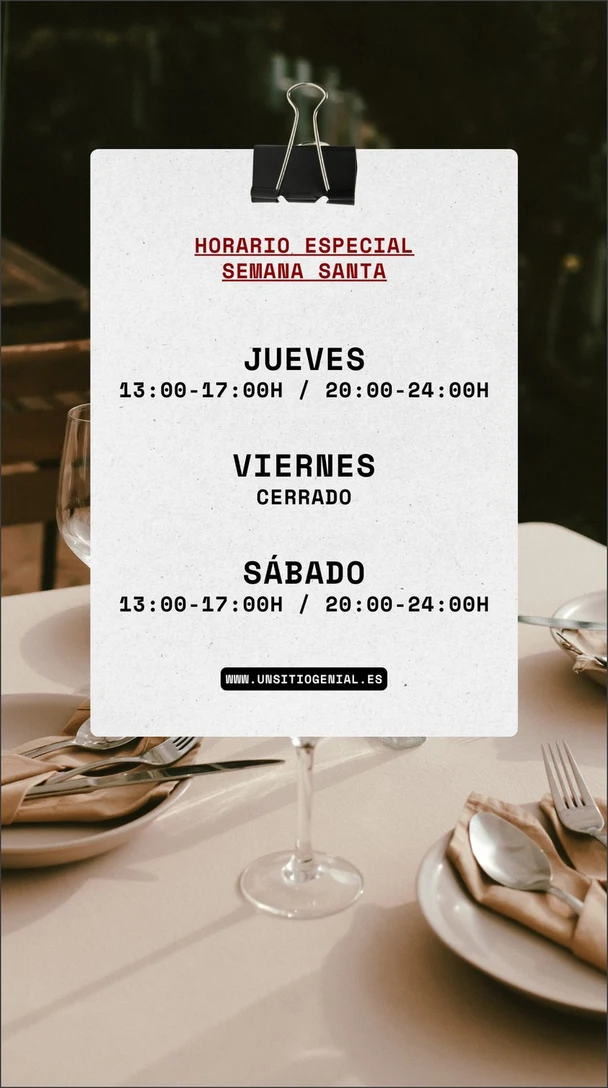
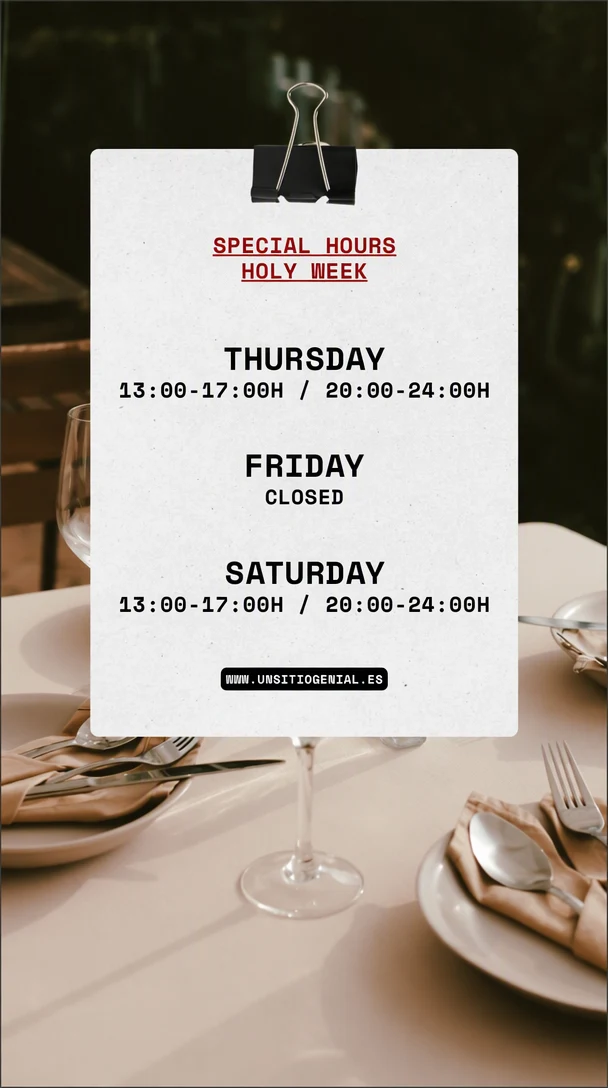
Before and after: a Spanish holiday-hours notice translated into English in place; the times and the web address were kept as written.
How the options compare
| Option | Best for | What you get | Keeps the design? | Edit each line before applying? | Cost model |
|---|---|---|---|---|---|
| ChatGPT (reading) | Understanding text in a photo | A text translation in the chat, with explanations if you ask | No new image is made | Not applicable; you can ask for corrections in the chat | Included in ChatGPT plans, including the free plan, with usage limits |
| ChatGPT Images (redrawing) | Trying a translated version of an image | A newly generated image | It tries, but layout and details can shift | Partly; you can approve the wording first, but check the redraw | Included in ChatGPT plans, including the free plan, with usage limits |
| Google Lens or the Google Translate camera | Quick reading on your phone | A translation shown on your screen | Made for reading, not for a finished design | Not applicable; it is for reading | Google describes Translate as offered free of charge |
| EditText.ai Translate | A translated image you can publish | The same image with the chosen lines replaced by their translations | Yes, that is its purpose; check the result | No; you choose which lines to translate, then check the result | 1 or 2 credits per image, with one free Standard edit (watermarked); see pricing |
Each option has a place. ChatGPT is a good choice when you want an explanation as well as a translation. Google's camera tools suit quick reading while you travel. A translate-in-place tool suits images you plan to publish, because it aims to change only the text you choose and keep the rest of the design.
Quality tips before you publish a translated image
- Ask a native speaker to review it. Anything public, such as a poster, a product image or an app screenshot, should be checked by someone fluent in the target language.
- Keep a glossary. List brand names, product names and terms that must stay untranslated or always be translated the same way, and check each one.
- Watch the length. Translated text is often longer than the English original. The W3C's guidance on text size in translation explains that short labels can grow the most in proportion and that some scripts need more vertical space. Leave room in the design, or shorten the wording.
- Check line breaks and small text. Make sure words don't break in odd places and that small print is still readable.
- Use a professional for high-stakes content. For legal, medical or safety-critical text, work with a professional translator rather than relying on any automatic tool.
Common uses
- Posters and flyers. Keep the layout and lettering when you translate a poster for another audience.
- Product images. Prepare listing images for new markets when you translate product images.
- AI-generated images. If an AI image has broken or misspelled text, fix text in AI images before you translate it.
- Retypesetting. To set the translation yourself in a design tool, first remove text from an image so the background is clean.
- New words in the same language. If you only need to change the wording, you can edit text in an image with the same font.
Only translate and publish images you own or have permission to change, and don't remove watermarks or credits.
Translate your image
If you need the translated image itself, not just its meaning, try a translate-in-place tool. Upload your image to translate text in an image with EditText.ai, choose the language and the lines to translate, and check every line of the finished image before you download it.
Frequently asked questions
Can ChatGPT translate from a photo?
Yes. Upload the photo and ask for a translation into your language. For the most reliable result, ask for a line-by-line translation, tell it to keep names and numbers unchanged, and ask it to flag words it can't read. OpenAI notes that small text, rotated text and non-Latin alphabets such as Japanese or Korean are harder, so check those with extra care.
Is ChatGPT or Google Translate better for translating a photo?
They suit different moments. Google Lens and the Google Translate camera are built for quick reading: you point your phone at the text and see a translation on the screen. ChatGPT is a better fit when you also want an explanation, such as what a dish is or whether a phrase is formal. For a translated image to publish, you need a tool that redraws the text.
Can ChatGPT translate an image and keep the same design?
It can try. Ask ChatGPT Images to replace the text with an approved translation and to keep everything else unchanged. Because it generates a new version of the image, the layout, the lettering and nearby details can shift, and the spelling in the target language can contain errors. Check every line, or use a translate-in-place tool that replaces only the lines you choose, and check its result the same way.
Can ChatGPT read Japanese, Chinese or Korean text in a photo?
It can try, but OpenAI's help center notes that the model handles text in non-Latin alphabets, such as Japanese or Korean, less well. Use a sharp, straight photo with large text, ask for a line-by-line copy of the original before the translation, and ask it to mark unclear characters. For anything important, confirm the result with a second tool or a fluent speaker.
How many languages can EditText.ai translate an image into?
EditText.ai's Translate tool can translate the text in an image into any of the 35 languages the site is available in. All detected text is translated unless you switch off Translate all text and choose the lines yourself, and prices, links and names are kept where possible. Translating an image costs a normal edit, 1 credit at Standard or 2 at High quality. Check the finished image, and ask a fluent speaker to review anything you plan to publish.
Is it safe to upload photos to ChatGPT for translation?
Uploading a photo sends a copy of it to OpenAI, so avoid photos that show personal or confidential details you don't want to share. In ChatGPT, OpenAI's help center describes a Data controls section in Settings, where you can turn off "Improve the model for everyone" so that new conversations are not used to train OpenAI's models.