To convert handwriting to text, take a sharp, flat, well-lit photo of the writing and run it through a tool that reads handwriting. Google says Lens can copy handwritten text, and EditText.ai's handwriting to text tool reads clear handwriting as typed lines you can copy. Neat writing works best, and messy or faint writing can come back with mistakes. Treat the result as a first draft and check every name and number against your photo. If you wrote on a tablet with a pen, you may not need a photo at all.
What to expect from handwriting to text
Handwriting varies far more than print, so the result depends on the writing and on the photo.
- Easier: neat, evenly spaced writing with separate letters, in dark ink on plain light paper or a clean board.
- Harder: joined-up cursive, slanted or cramped lines, faint pencil, decorative lettering, and writing that crosses ruled lines or stains.
- Where mistakes matter most: names, numbers and abbreviations, because a wrong letter or digit can still look like a real word or figure.
- No corrections: the tool copies what it reads, so a misspelling in the writing stays a misspelling.
When most of a page comes back right, you save the typing and fix only the lines that didn't. When a page comes back with many errors, retake the photo before you start correcting.
Take a photo that reads well
The photo is the part you control, and it matters more than which tool you pick.
- Use even light. Avoid shadows from your hand or phone, and glare on glossy paper or a whiteboard. If a light reflects off the surface, change your angle or turn off the flash until the glare leaves the writing.
- Keep the page flat. A curved notebook bends the lines and the letters. Hold the page down at the edges.
- Shoot straight on. Hold the phone parallel to the page, so the lines run straight and the letters stay the same size from edge to edge.
- Crop to the writing. Remove the table, your fingers and the margins, so the writing fills the image.
- Use one page per image. For a longer note, photograph each page and read them one after another. For a big whiteboard, take one section at a time.
- Keep the original file. A copy that was shrunk or compressed when you shared it has less detail to read.
Ways to convert handwriting from a photo
- Google Lens in Google Photos (Android). Google's Lens tips say you can photograph text, including something handwritten, and copy it to your clipboard. Our guide to how to copy text from an image has the steps.
- Live Text, OneNote and Google Docs. Apple, Microsoft and Google describe these as tools for text in pictures. Try one on a single page of your own writing before you photograph a whole notebook.
- EditText.ai Image to text. It works in any browser and reads clear handwriting, such as notes, chalkboard menus and labels written by hand. EditText.ai publishes this guide and is one of the options.
Convert handwriting to text with EditText.ai
- Photograph the writing with the tips above, and crop it.
- Open Image to text and sign in with Google.
- Upload the photo as a PNG, JPG or WebP file up to 14 MiB. For notes you scanned to a PDF, use PDF to text.
- Read the text beside the photo. It comes back in reading order, one line for each line of writing, with a blank line between separate blocks. It keeps the original language and characters and doesn't translate.
- Compare it with the handwriting, line by line.
- Select Copy all, copy a single line, or download a .txt file. Fix mistakes in your own document, where you can type over them.
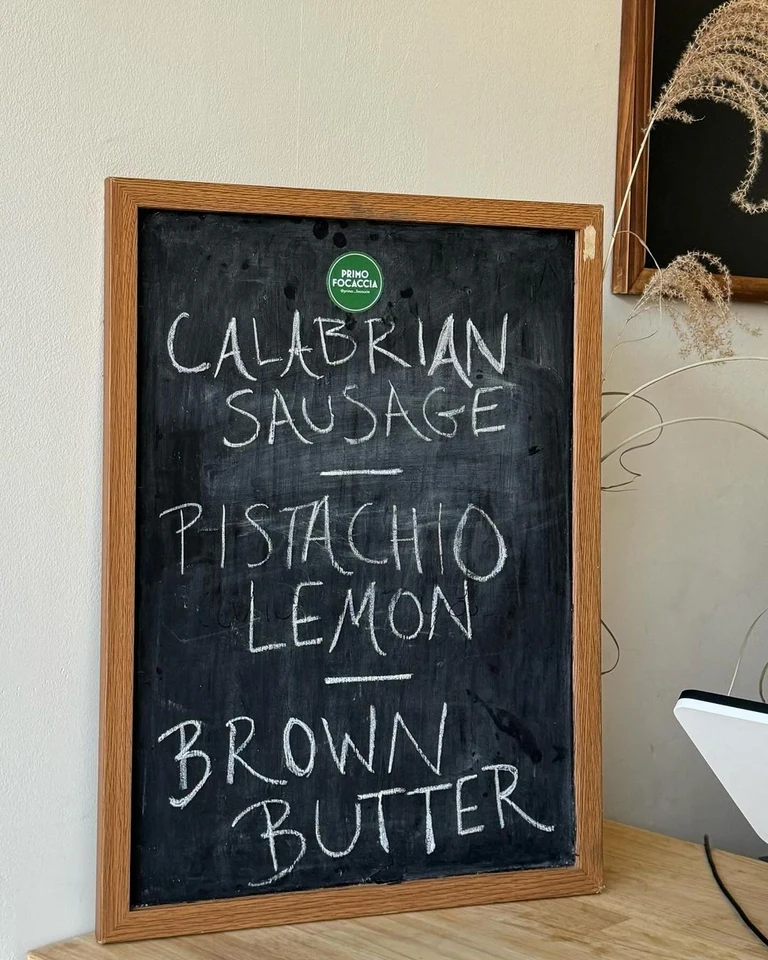
Chalk lettering read as typed text (from the Image to text examples). The board comes back one word per line, and the text on the sticker is read too.
Reading text uses no credits. The tool reads one image at a time. Neat, clear handwriting works best, and messy, faint or slanted writing can come back with mistakes or missing words. Your photo is saved in My images, private to your account, and you can delete it when you no longer need it.
Notes, whiteboards, chalkboards, letters and recipe cards
- Notebook pages. Photograph one page at a time, flat, so the lines run straight across the photo.
- Whiteboards. Photograph the board before it is erased. Pale marker colors are low contrast on white, so they are more likely to be misread.
- Chalkboards. Decorative lettering with flourishes is stylized text, which can be misread or skipped. Compare any menu or price list with the board.
- Letters and cards. Cursive and older handwriting styles are the hardest to read. Keep the photo next to the text so you can check any line that looks wrong. Letters often hold other people's names and addresses, so delete the photo when you are done.
- Recipe cards. Check every quantity and temperature. One wrong digit changes the dish.
If you wrote it on a tablet
If the handwriting is digital ink, convert it in the app instead of photographing the screen. In OneNote for Microsoft 365, 2024, 2021 and 2016, select the ink with the Lasso Select button on the Draw tab, then choose Ink to Text. Microsoft says this isn't available in OneNote for the web. On an iPad, Scribble turns Apple Pencil writing into typed text in any text field. Other note apps have their own conversion, so check the app's help.
Check the text before you use it
Compare the typed text with the writing, not with your memory. A quick count helps: if the photo has twelve lines and the text has ten, find the two that are missing. Then look hardest at the details that matter most:
- Names and their spellings.
- Numbers, such as dates, times, quantities and phone numbers.
- Prices and other amounts of money.
- Email and web addresses, where one wrong character breaks the whole address.
- Look-alike characters, such as 1 and 7, or 0 and O.
Start with one page
Photograph one page and run it through the tool you prefer. If it reads cleanly, do the rest of the notebook the same way. If it doesn't, retake the photo with the tips above before you try another tool. To try EditText.ai, upload the page to convert handwriting to text. The text appears beside your photo, and you can copy it or download it.
Frequently asked questions
How accurate is handwriting to text?
It depends on the writing and the photo. Neat, clear handwriting in good light works best. Messy, faint or slanted writing can come back with mistakes or missing words, so compare the text with the photo before you rely on it.
Can handwriting to text read cursive?
Joined-up writing is harder to read than separate letters, so expect more mistakes and check every line. A sharper, straighter photo helps most. If a page still comes back with many errors, retyping it may be faster than correcting it.
Can I convert a whiteboard photo to text?
Yes, when the writing is clear. Photograph the board straight on before it is erased, avoid glare, and take one section at a time. Crop to the writing, then compare the result with the board.
Does it translate my handwriting?
No. EditText.ai returns the text in the language it was written in, with the original characters and accents. To put the words in a picture into another language, use translate text in an image, which changes the image and uses credits.